
「前往價格頁」對人類很簡單,但對 Browser Agent 可能意味著展開漢堡選單、找第二層選項、判斷同名連結。Navigation Tool 的核心不是讓 AI 模擬 click(),而是把網站的目的地語意公開出來。
今天做 navigate_to_section,但也會討論一個問題:Navigation 到底需要 Tool,還是回 URL 就夠了?
name: 'click_menu_item'
Schema:
{
  index: 3
}
這只是把脆弱的 UI Automation 包了一層 Tool。
如果選單順序改了,Tool 還是壞。
我們真正想表達的是:
pricing
contact
documentation
account
而不是:
third menu item
button #7
right-side link
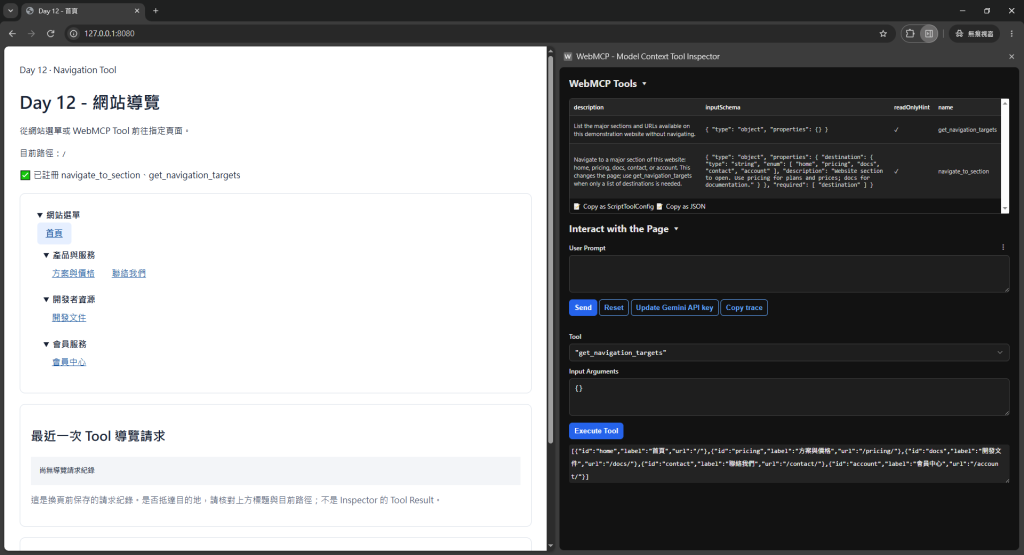
📸 圖片 1|原本需要 Agent 判斷的複雜網站選單
const destinations = {
  home: '/',
  pricing: '/pricing',
  docs: '/docs',
  contact: '/contact',
  account: '/account'
};
Tool:
await document.modelContext.registerTool({
  name: 'navigate_to_section',
  description: 'Navigate to a major section of this website such as pricing, documentation, contact, or account.',
  inputSchema: {
    type: 'object',
    properties: {
      destination: {
        type: 'string',
        enum: ['home', 'pricing', 'docs', 'contact', 'account'],
        description: 'Website section the user wants to open.'
      }
    },
    required: ['destination']
  },
  annotations: {
    readOnlyHint: true
  },
  execute: async ({ destination }) => {
    const path = destinations[destination];

    if (!path) {
      return JSON.stringify({
        status: 'invalid_input',
        message: 'Unknown destination.'
      });
    }

    location.assign(path);
  }
});
導航型 Tool 有一個特殊點:執行可能觸發 navigation,因此目前 API 行為和一般回傳字串 Tool 不完全相同。實務上不要假設頁面跳轉後原本 JavaScript Context 還存在。
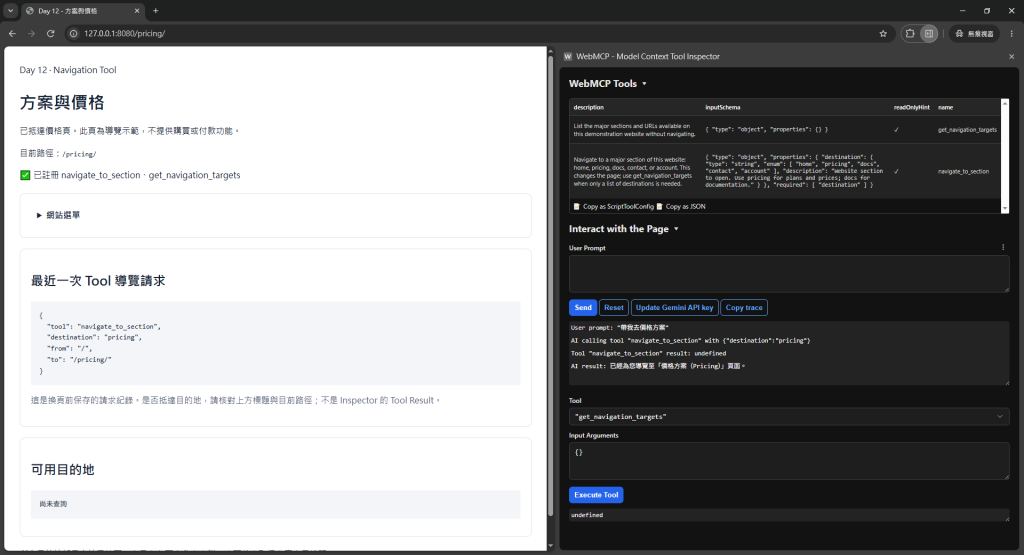
📸 圖片 2|自然語言意圖直接導向正確頁面
如果 Agent 的任務只是:
官網的 API 文件在哪?
其實 Search Tool 直接回:
{
  "title": "API Docs",
  "url": "/docs/api"
}
可能就夠了。
不要為了「有 WebMCP」把每個連結都做 Tool。
我會把 Navigation Tool 留給:
<a>。單純公開文件網址,普通 link 仍然很好。
React/Vue 類型網站可能不是:
location.assign('/pricing');
而是:
router.push('/pricing');
Tool 應該呼叫你既有 router:
execute: async ({ destination }) => {
  const path = destinations[destination];
  await router.push(path);
  return `Navigated to ${destination}.`;
}
再次證明:WebMCP Tool 是 Adapter,不應自己重造 Routing System。
如果目的地很多,不想 enum 50 個值,可以提供 read-only discovery:
await document.modelContext.registerTool({
  name: 'get_navigation_targets',
  description: 'List the major sections available on this website.',
  inputSchema: {
    type: 'object',
    properties: {}
  },
  annotations: {
    readOnlyHint: true
  },
  execute: async () => {
    return JSON.stringify([
      { id: 'pricing', label: '方案與價格' },
      { id: 'docs', label: '開發文件' },
      { id: 'contact', label: '聯絡我們' }
    ]);
  }
});
然後再讓 Agent 選目標。
不過 Tool 數量也要節制,否則只是把一個問題拆成更多問題。
/account 是會員頁,不代表只要 Agent 知道路徑就可以看到資料。
Server 仍必須驗證 Session。
Navigation Tool 最多是:
我知道去哪裡
不是:
我因此有權限進去



 iThome鐵人賽
 看影片追技術